Skip to content
Skip to the press release
Press release Paris · November 3, 2026

Paris-based kdpbook.io is an AI book studio for Amazon Kindle Direct Publishing (KDP).

AI writes, code measures: kdpbook.io turns a chat into a KDP-ready book

AI writes and illustrates; code applies Amazon KDP print rules; the listing sheet pre-fills the AI-disclosure answers from what was actually generated. The author still clicks Publish.

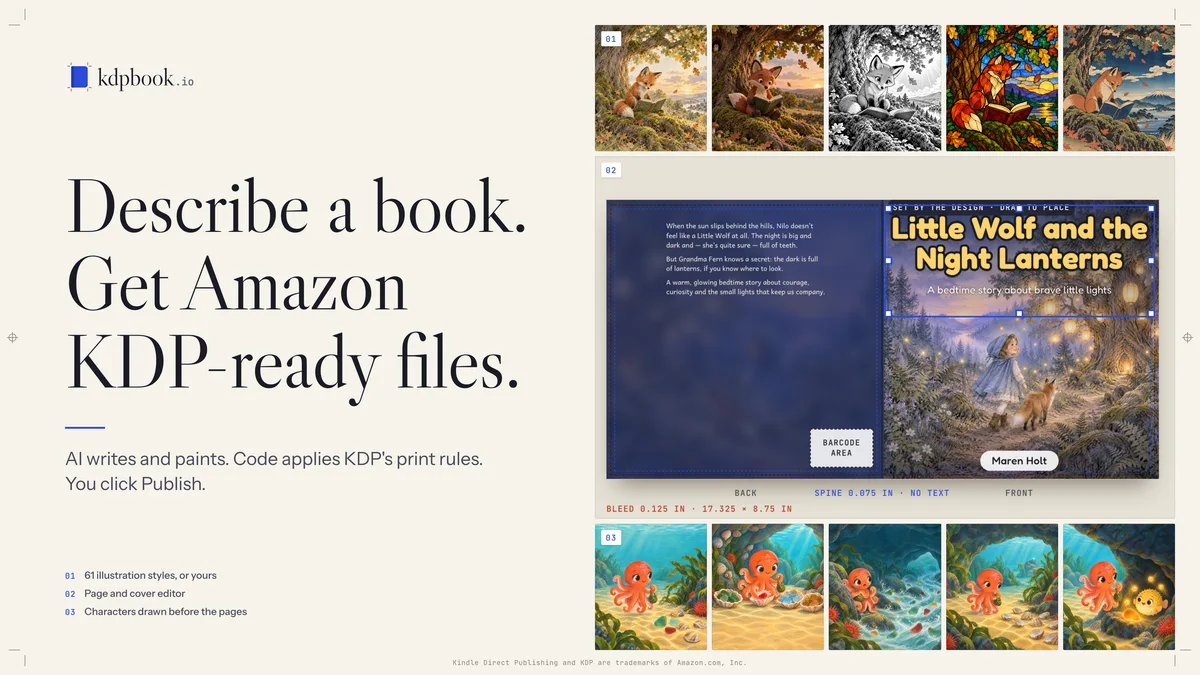
Key visual · EN PNG · 4K · 4.8 MB
kdpbook.io key visual in English: “Describe a book. Get Amazon KDP-ready files.”, with illustration style samples, the full-wrap cover editor and a character drawn the same way on every page.
What it is
AI book studio for Amazon KDP, in the browser
Made in
Paris, France
Launched
September 26, 2026
Founder
Arsène Huot
Control strip · CMYK + cobalt #2B4BDB · proof 01 · EN
01 Film

See it at work

Films with an English voice-over and silent recordings of the real interface. Every file downloads as an MP4, with its poster frame.

Chapters of the reel

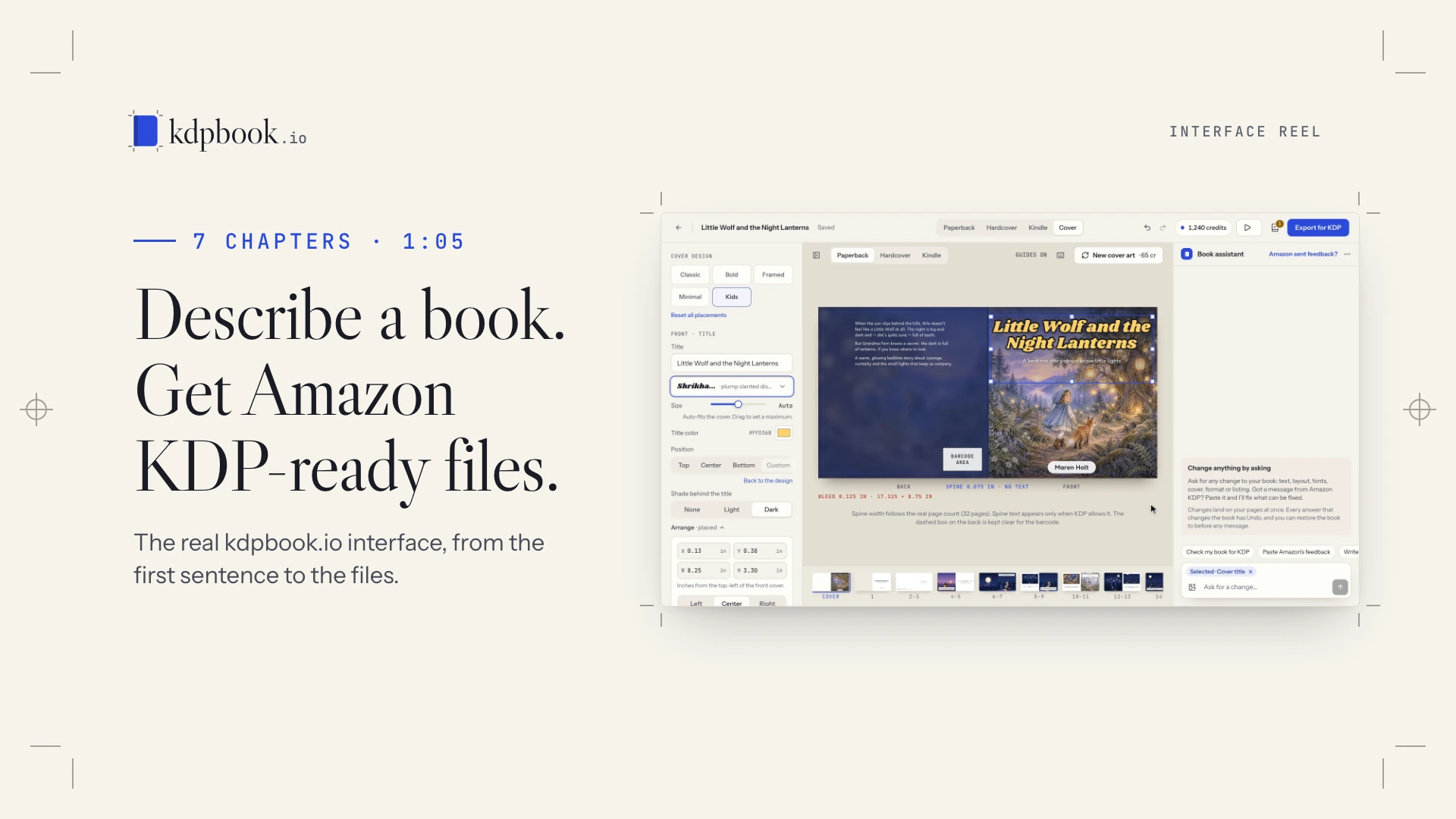
Interface reel: from one sentence to KDP files

The real interface on a sample picture book, from a one-sentence idea to the 3D reader. Silent and without music, so it runs under your own voice or captions.

Illustrations AI-generated with kdpbook.io (sample by the kdpbook team).

02 Press release

The release, as a proof

The full text, with fact-check notes in the margin. Copy it, or take the PDF, Word or text file.

Galley proof · EN · kdpbook-press-release-en.pdf For release November 3, 2026

Press release · kdpbook.io

AI writes, code measures: kdpbook.io turns a chat into a KDP-ready book

AI writes and illustrates; code applies Amazon KDP print rules; the listing sheet pre-fills the AI-disclosure answers from what was actually generated. The author still clicks Publish.

PARIS, November 3, 2026 — The Paris-built AI book studio kdpbook.io lets AI write and illustrate a book but leaves the exact print rules of Amazon's self-publishing service, from bleed to spine width, to code, not AI. An author describes a picture book in a chat, downloads the files Kindle Direct Publishing (KDP) asks for and still clicks Publish.

Since its September 26 launch, the studio has added comic and manga panels with speech balloons, 21 illustration styles for 61 in all, and kdpbook Publisher, a Chrome and Edge extension that, on paid plans, fills in and saves an author's KDP draft but never publishes it. Founder Arsène Huot calls it "vibe publishing," after vibe-coding tools that turn a description into an app.

Why a KDP-ready book is hard

KDP expects exact numbers: a trim size, an extra 0.125 inch of "bleed" on three sides for art that runs off the page, an inner margin that widens with page count, and a wraparound cover whose spine width depends on page count and paper. The Kindle edition needs its own file, and the listing asks whether AI generated any text, images or translations. Miss a number and KDP can send the book back.

How it works

  1. The author describes the book in a chat, or imports a manuscript, and sees a credit estimate before anything is generated.
  2. The studio writes the text, or typesets the author's own in 20 of the 36 types, draws reference sheets of the main characters, then paints the pictures and cover.
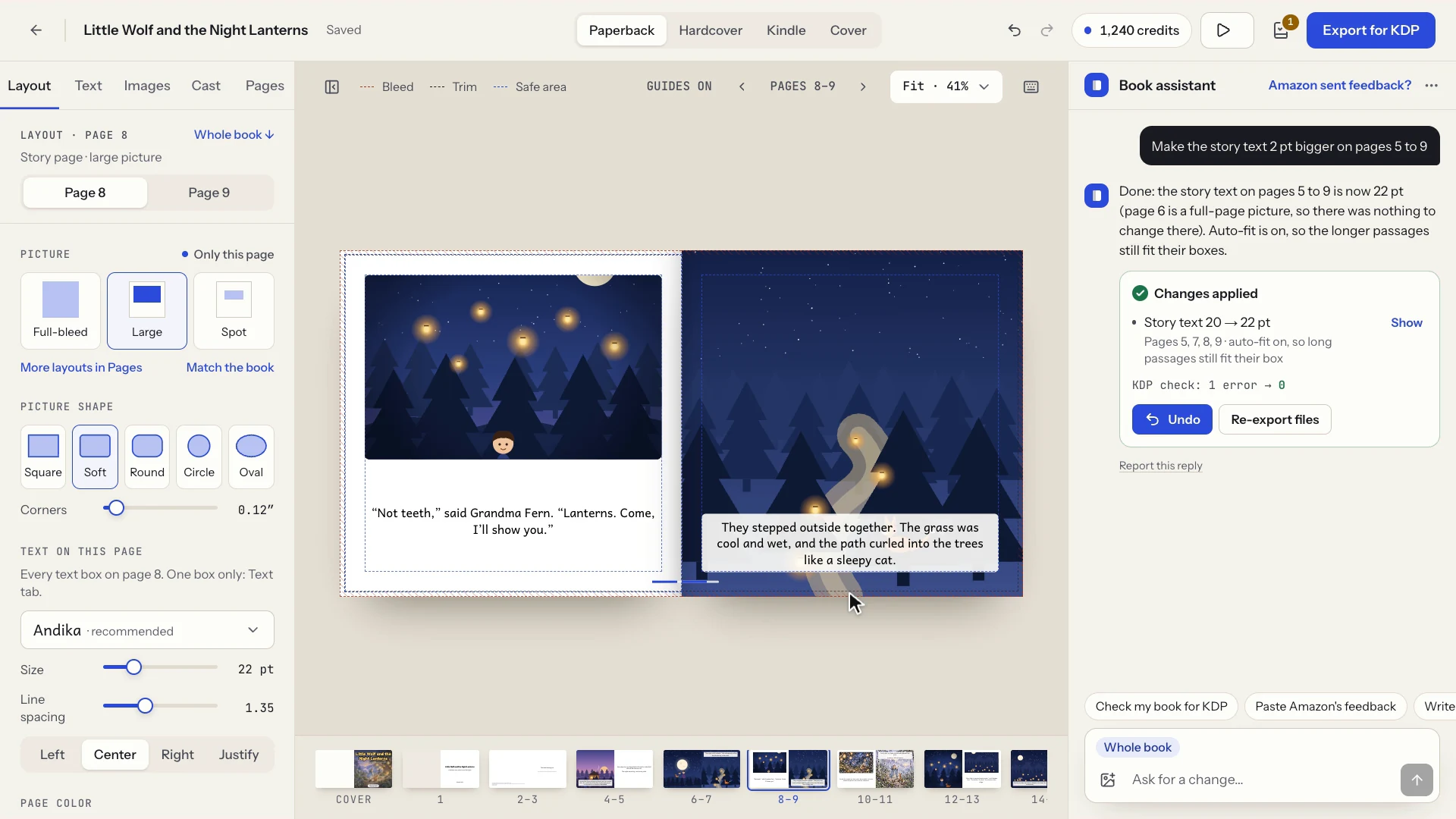
  3. The author edits by hand, for free, or asks the Book assistant in plain words.
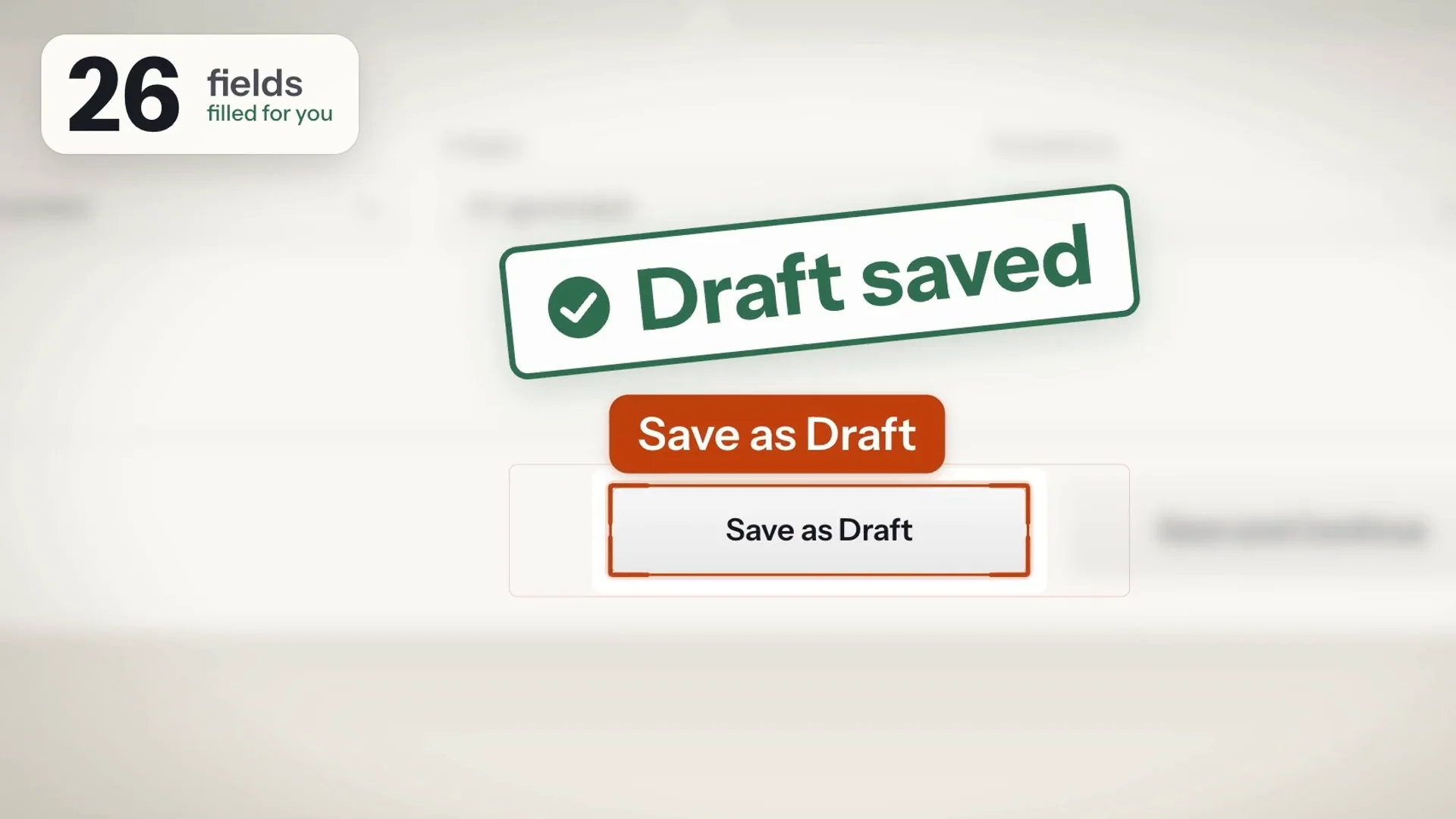
  4. The author uploads the files to KDP or, on a paid plan, lets kdpbook Publisher (Chrome or Edge) fill in and save the KDP draft, then reviews it and clicks Publish.

Inside the studio

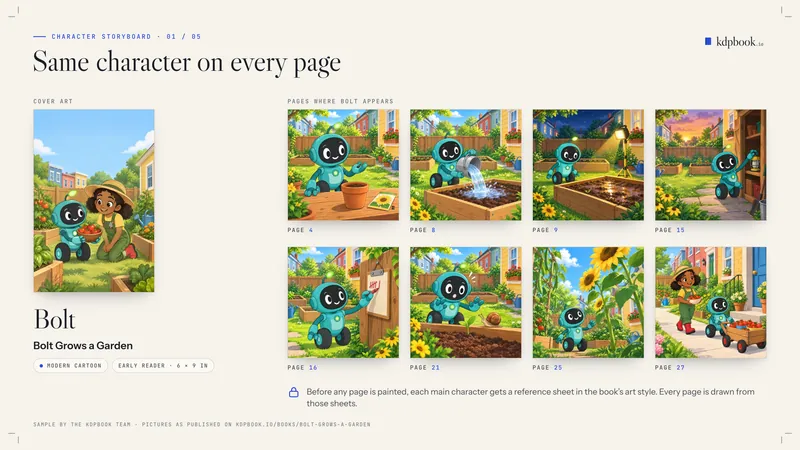
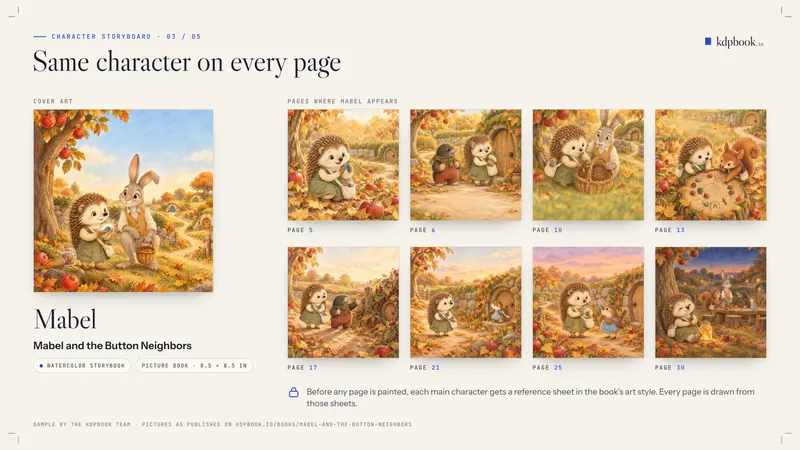
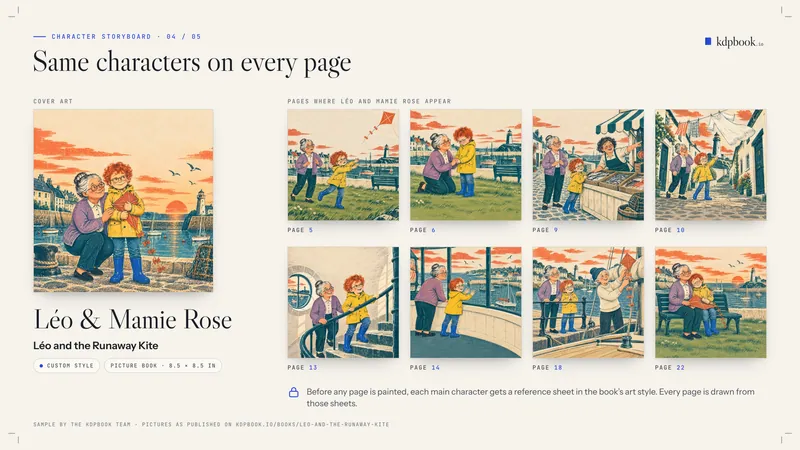
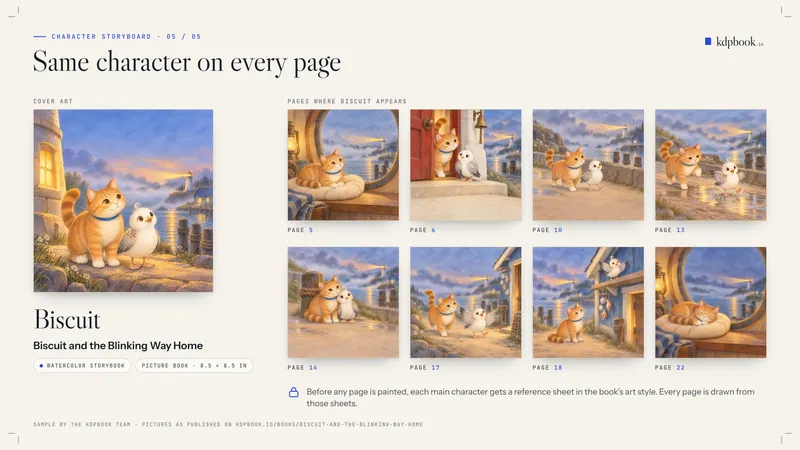
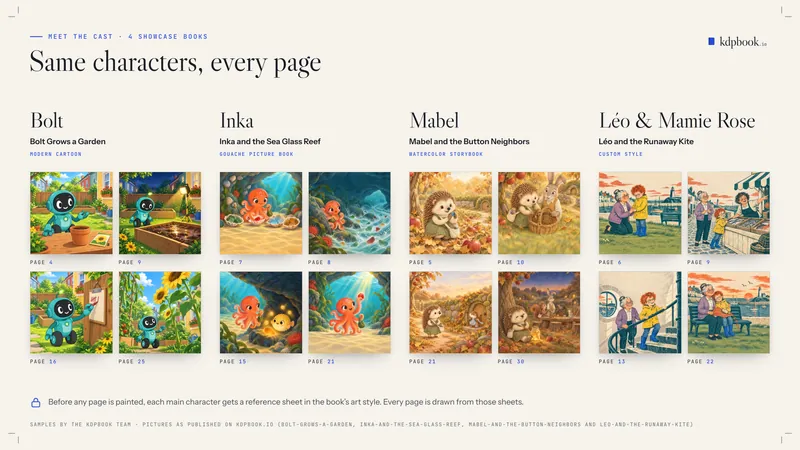
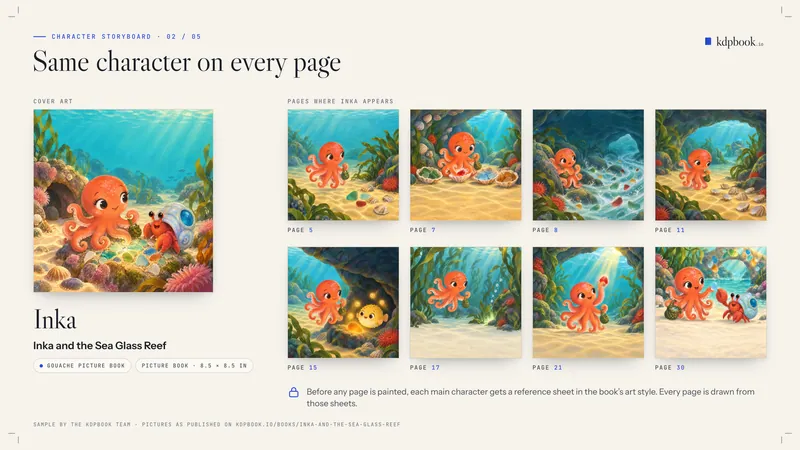
  • Characters drawn before the pages. The main characters at the top of the cast get reference sheets in the book's style: front, three-quarter view, action pose. Pictures and cover are painted from the sheets of the characters shown, to keep faces and outfits consistent.
  • Book assistant. A chat in the editor changes text, fonts, layouts, pages, cover and listing for about 40 credits a message; repaints and AI rewrites cost extra. It explains 26 known KDP rejection messages and fixes what it can.
  • Page editor and repaints. Pages appear as KDP will print them, in 112 fonts or the author's own, and any picture can be repainted from a note, for the same credits as the original painting.
  • KDP rules in code, then checked. Trim, margins, bleed, spine width, page limits and barcode area are applied by code, not AI. A KDP check runs during editing and again on the exported files, with one-click fixes.
  • The files KDP asks for. A print interior PDF, a full-wrap cover PDF (back, spine and front in one file), a Kindle EPUB for books with a Kindle edition, and a listing sheet with seven keywords, categories and AI-disclosure answers pre-filled from what was generated.
  • KDP drafts filled in, not published. On paid plans, kdpbook Publisher works on a computer, in the author's own signed-in KDP tab, and stops at a saved draft.
“An AI can write a charming picture book and still miss the bleed by an eighth of an inch. So the AI does the writing and the painting, and plain code does the measuring. Our extension fills in the KDP draft and stops there: the Publish button belongs to the author.”
Arsène Huot, founder of kdpbook.io

Availability and pricing

The studio runs in the browser at https://kdpbook.io. Each new author gets 2,000 free credits once, no card required; a 32-page picture book at default settings is estimated at 1,614 credits, roughly $16 at Starter-plan rates. Free-plan exports carry a "kdpbook.io preview" watermark and are not for sale, and finished free-plan books are public in the community library. Paid plans export watermark-free files with a commercial license: Starter costs $25 a month, Author $49 and Studio $99 (U.S. dollars, before tax).

AI disclosure and limits

Amazon KDP requires publishers to disclose AI-generated text, images or translations. The listing sheet pre-fills those answers from what the studio actually generated (a manuscript the author wrote and imported does not count), and the author is responsible for the final answers. Authors must confirm permission before a photo of a person becomes a character. KDP reviews every book; kdpbook.io does not guarantee acceptance and is not affiliated with Amazon.

Notes to editors

Website
https://kdpbook.io. Press kit, with the release in 10 languages, images, videos and logos: https://kdpbook.io/press
Launched
September 26, 2026, in Paris, France
Founder
Arsène Huot. Company: THE VIBECODING AGENCY (SARL), Paris
Book types and styles
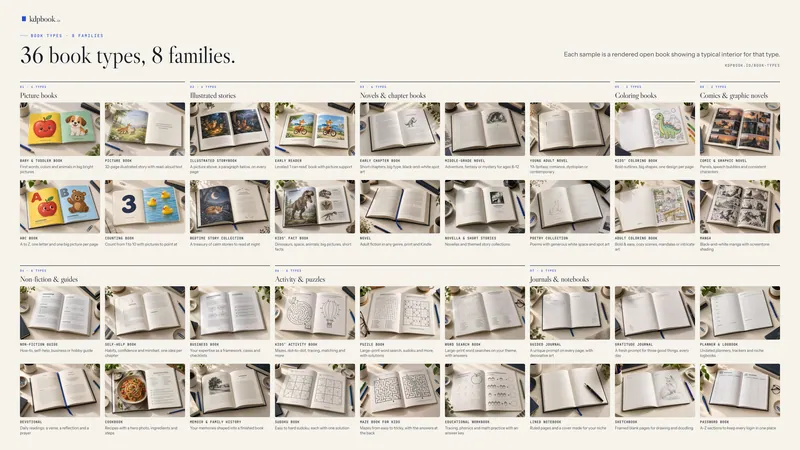
36 types in eight families, from picture books and coloring books to novels, guides, journals and comics; 61 illustration styles in 10 families, or a custom style from words or up to three reference pictures
Manuscript import
Word, PDF, Markdown or plain text, up to 4 MB (no EPUB); printed word for word in 20 of the 36 types, read as a brief by the other 16 (coloring, activity, puzzle and journal books among them)
Languages
34 that KDP publishes, one per book (KDP takes some only in print or only as eBooks); the interface is in English
Formats
Paperback (16 KDP standard trim sizes), hardcover (five trim sizes) and Kindle eBook (reflowable or fixed layout); coloring, puzzle, activity, workbook, journal and notebook books and comic panel books are print only
KDP rules
Trim, margins, bleed, spine, page limits and barcode area applied by code from a rulebook checked against KDP Help on September 26, 2026
Sample books
Made by the kdpbook team, such as the 32-page watercolor picture book "Little Wolf and the Friendly Dark," readable page by page at https://kdpbook.io/u/studio

About kdpbook.io

Paris-based kdpbook.io is an AI book studio for Amazon Kindle Direct Publishing (KDP). An author describes a book in a chat or imports a manuscript; kdpbook writes the text or typesets the author's own, illustrates it, then exports the interior and full-wrap cover PDFs, a listing sheet and, for books with a Kindle edition, a Kindle eBook. It covers 36 book types, 61 illustration styles and 34 KDP languages. Founder Arsène Huot launched it in September 2026. It is operated by THE VIBECODING AGENCY and is not affiliated with Amazon. New authors get 2,000 free credits once. Kindle Direct Publishing and KDP are trademarks of Amazon.com, Inc.

Media contact

Arsène Huot, Founder, kdpbook.io
contact@thevibecodingagency.fr
Press kit: kdpbook.io/press

###

kdpbook.io · press release · EN · 2026-11-03 1/1
03 Inside the studio

Fourteen plates, one book studio

What each part does, in the release’s words, with the picture to run beside it and its files.

01 Describe a book 8 images · 1 video
Home page: describe your book (recording)
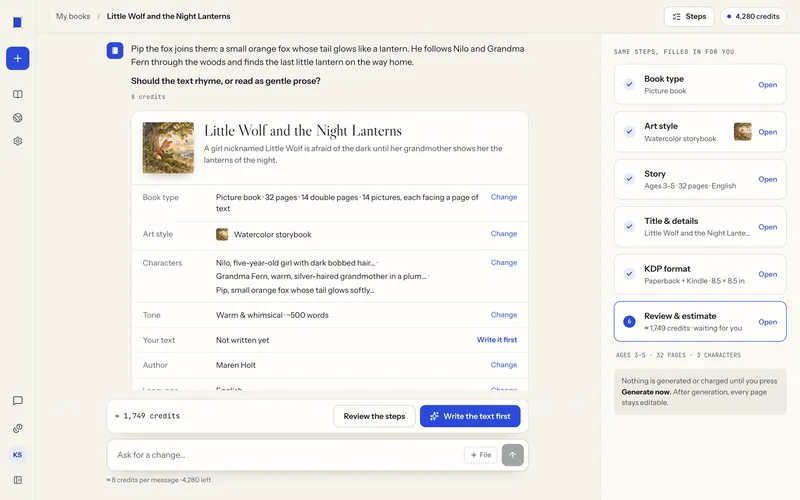
kdpbook generation screen saying Your book is ready, with a 3D picture-book cover, stats and buttons to read, edit and export.
Generation done: your book is ready
kdpbook wizard Review step with setting summaries on the left and a credit estimate table with a Generate my book button on the right.
Review and credit estimate before generating

Describe it or import it

Describe the book in a chat or six guided steps, or import a manuscript, printed word for word in 20 of 36 types. A credit estimate appears before anything is generated.

Screen: kdpbook.io, sample books by the kdpbook team.

An open journal on a dark background: a French prompt titled Jour 4 with numbered lines on the left, a black-and-white drawing of a table with a cup of tea on the right.

34 KDP languages

Books in 34 languages KDP publishes, one per book (some only in print or only as eBooks), with right-to-left layouts for Hebrew, Arabic, Persian and Yiddish and fonts checked for each alphabet.

02 Book assistant 3 images · 1 video
Plate 02 · 8 s · loop MP4 · 1920 × 1080 · 18 s · 954 KB
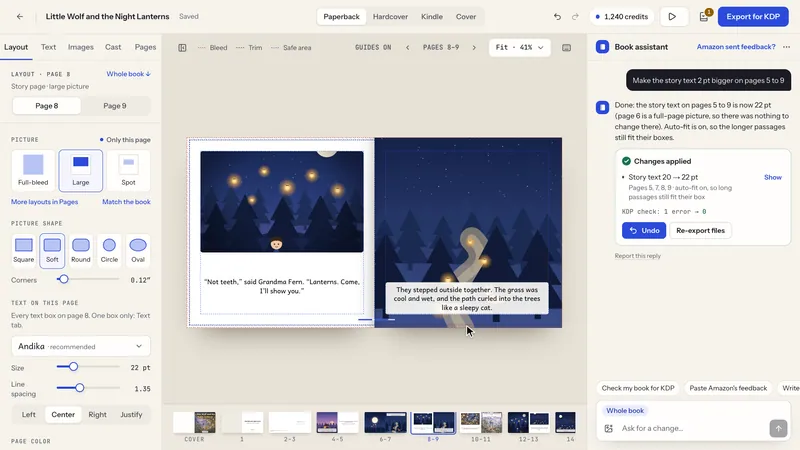
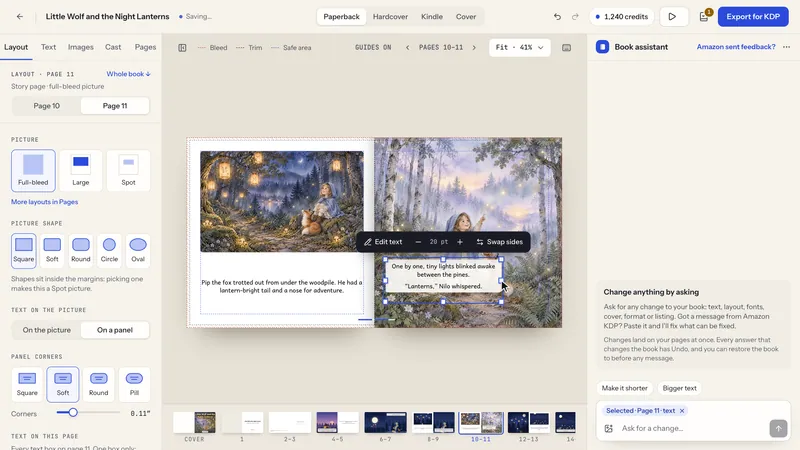
kdpbook editor with a picture-book spread in the middle and the Book assistant panel on the right showing a request and a Changes applied card.
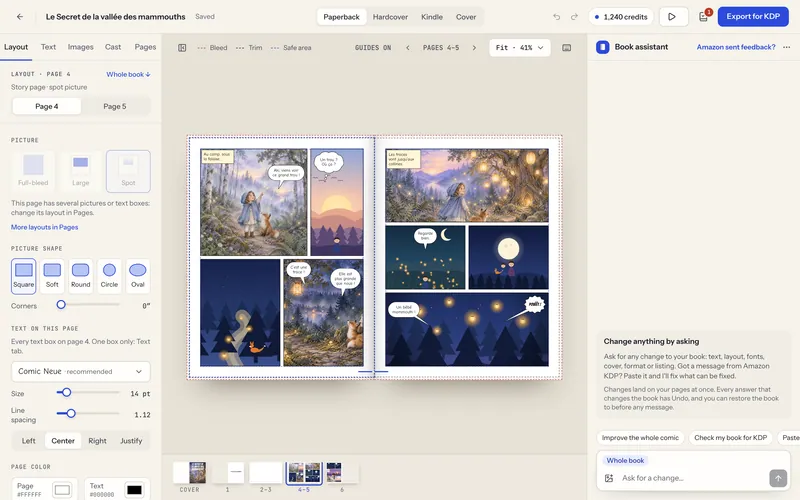
Book assistant: a change, applied
kdpbook editor with the Book assistant panel showing the answer to a KDP review email: three issues explained, a Changes applied card with Undo and a Your part checklist.
Book assistant: Amazon KDP feedback, fixed
kdpbook editor with the Book assistant panel showing a question about blurry pictures, a repaint card for two pictures in progress and a cover-art repaint card with its credit cost.
Book assistant: repaints proposed as cards

Book assistant: ask in plain words

A chat in the editor that changes text, fonts, layouts, pages, cover and listing for about 40 credits a message; repaints and rewrites cost extra. It explains KDP rejection emails and fixes what it can.

Illustrations AI-generated with kdpbook.io (sample by the kdpbook team).

03 Consistent characters 9 images
Grid of 18 thumbnails labelled Cover art, Page 1, Pages 2–3 to Pages 30–31 and Page 32: watercolor pictures of a wolf cub and his mother at night facing pages of typeset story text.
Book storyboard: every spread of one book
kdpbook generation screen with two character cards marked Sketching in the center, the pipeline on the left and the journal on the right.
Generation: the cast is drawn first
kdpbook wizard Characters section asking for photos of the characters, with three character cards and buttons to add more.
Characters: optional photo or drawing

Characters drawn before the pages

The main characters at the top of the cast get reference sheets in the book's style: front, three-quarter view, action pose. Pictures and cover are painted from these sheets, to keep faces consistent.

Illustrations AI-generated with kdpbook.io (sample by the kdpbook team).

04 Illustration styles 73 images · 1 video

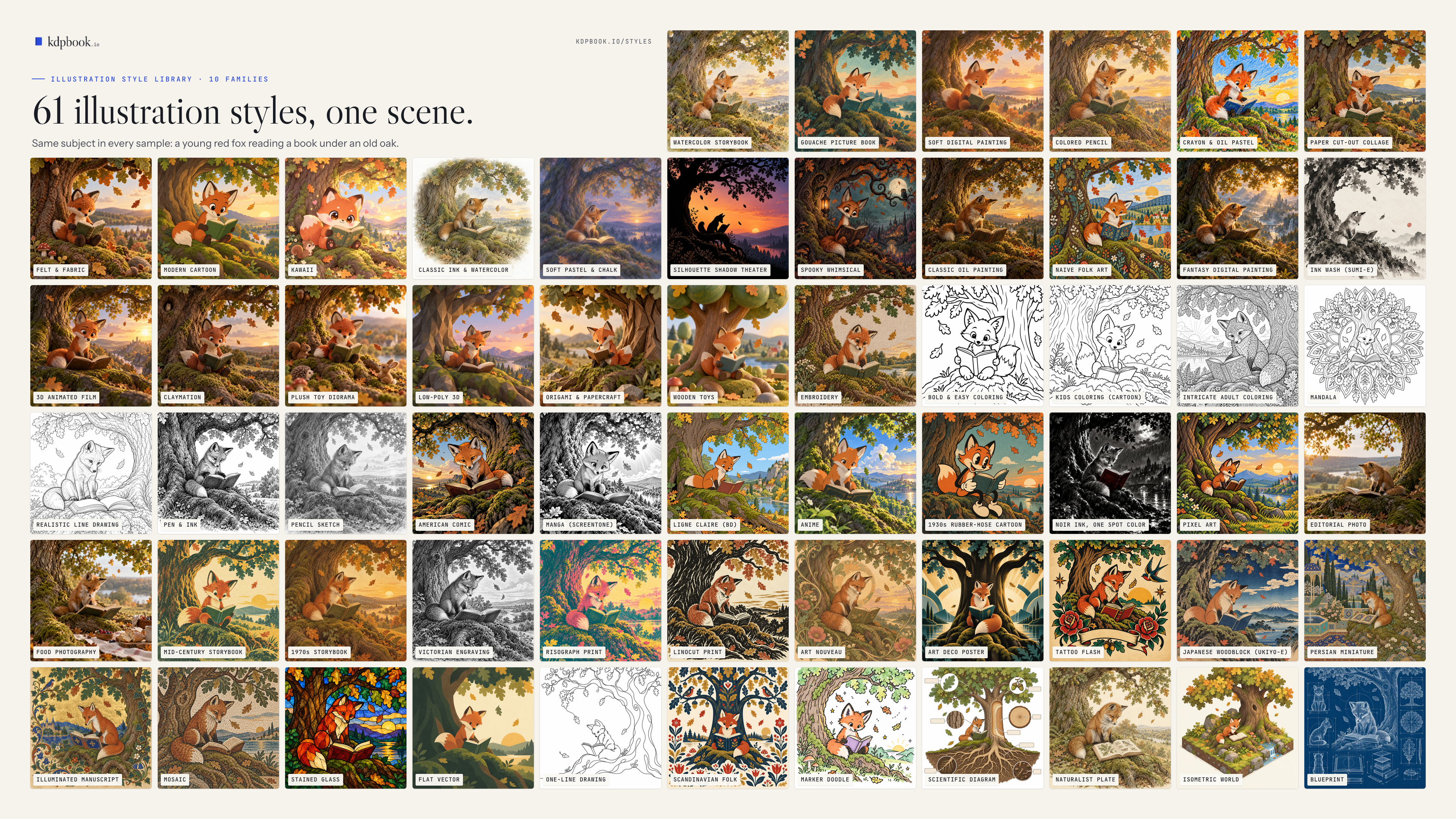
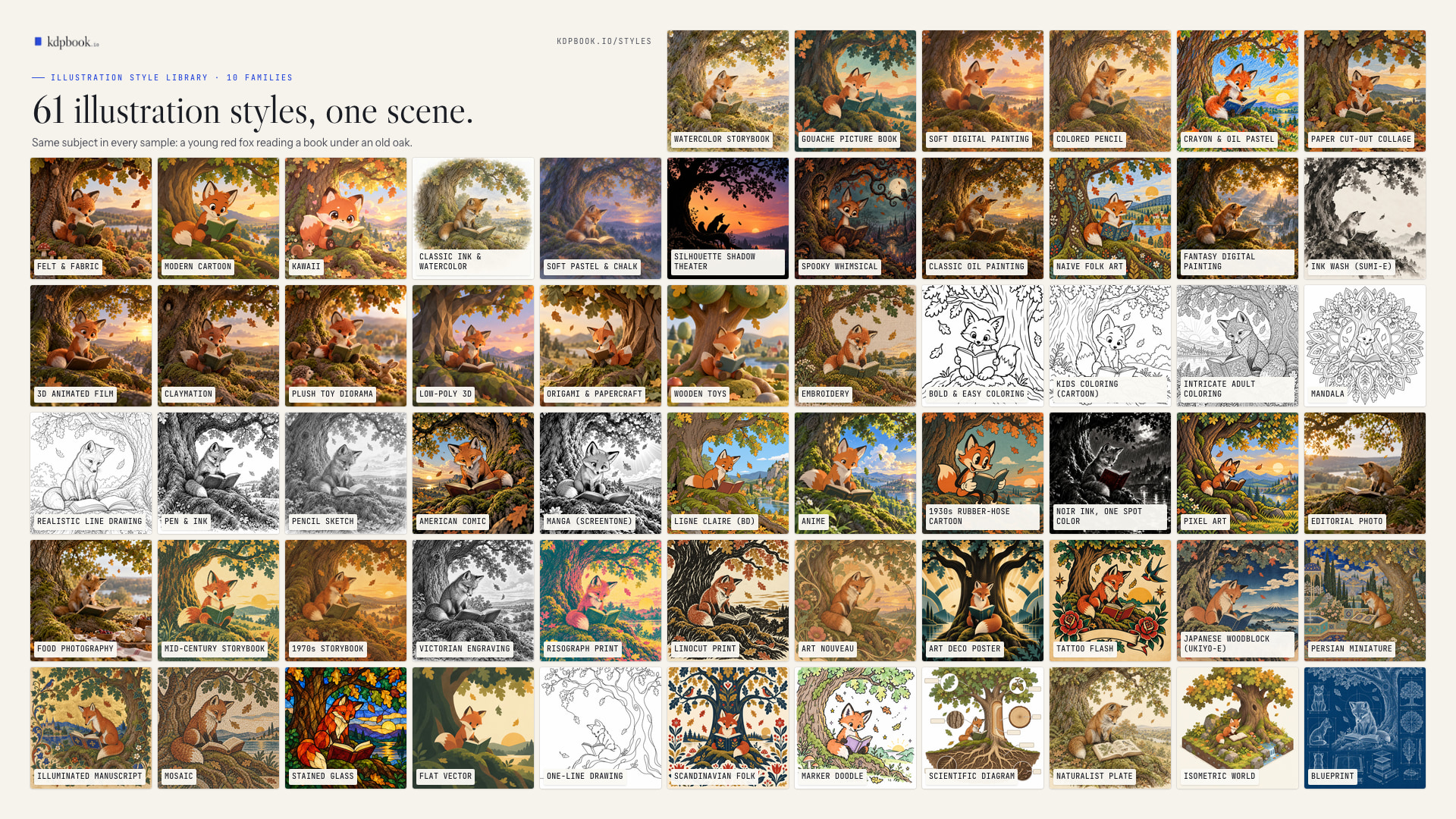
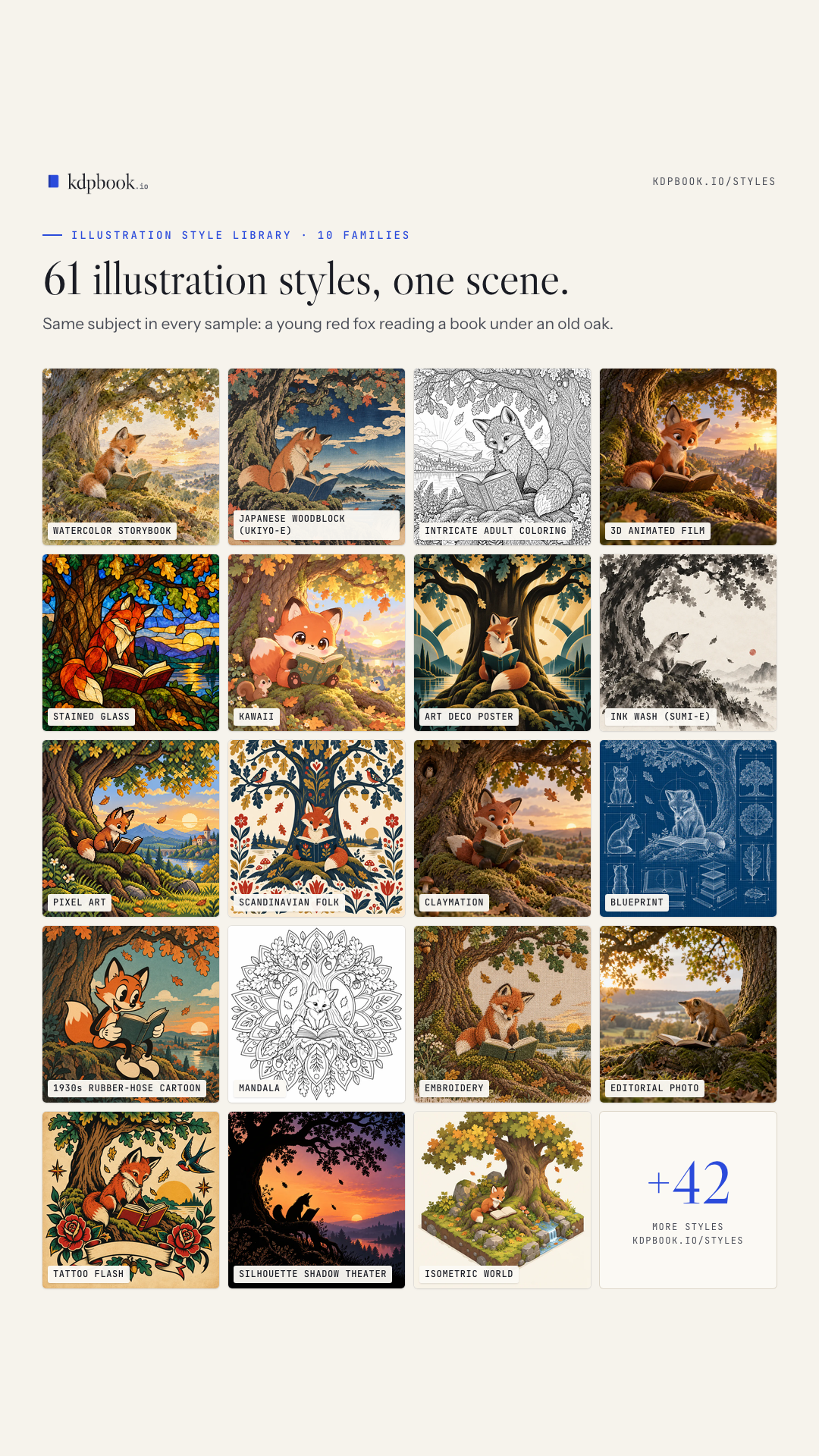
kdpbook.io · style library · one scene: a young red fox reading under an old oak

62 frames

  1. 01
  2. 02
  3. 03
  4. 04
  5. 05
  6. 06
  7. 07
  8. 08
  9. 09
  10. 10
  11. 11
  12. 12
  13. 13
  14. 14
  15. 15
  16. 16
  17. 17
  18. 18
  19. 19
  20. 20
  21. 21
  22. 22
  23. 23
  24. 24
  25. 25
  26. 26
  27. 27
  28. 28
  29. 29
  30. 30
  31. 31
  32. 32
  33. 33
  34. 34
  35. 35
  36. 36
  37. 37
  38. 38
  39. 39
  40. 40
  41. 41
  42. 42
  43. 43
  44. 44
  45. 45
  46. 46
  47. 47
  48. 48
  49. 49
  50. 50
  51. 51
  52. 52
  53. 53
  54. 54
  55. 55
  56. 56
  57. 57
  58. 58
  59. 59
  60. 60
  61. 61
  62. 62 Your own style: words, or up to 3 pictures

Circled: the styles named in the release

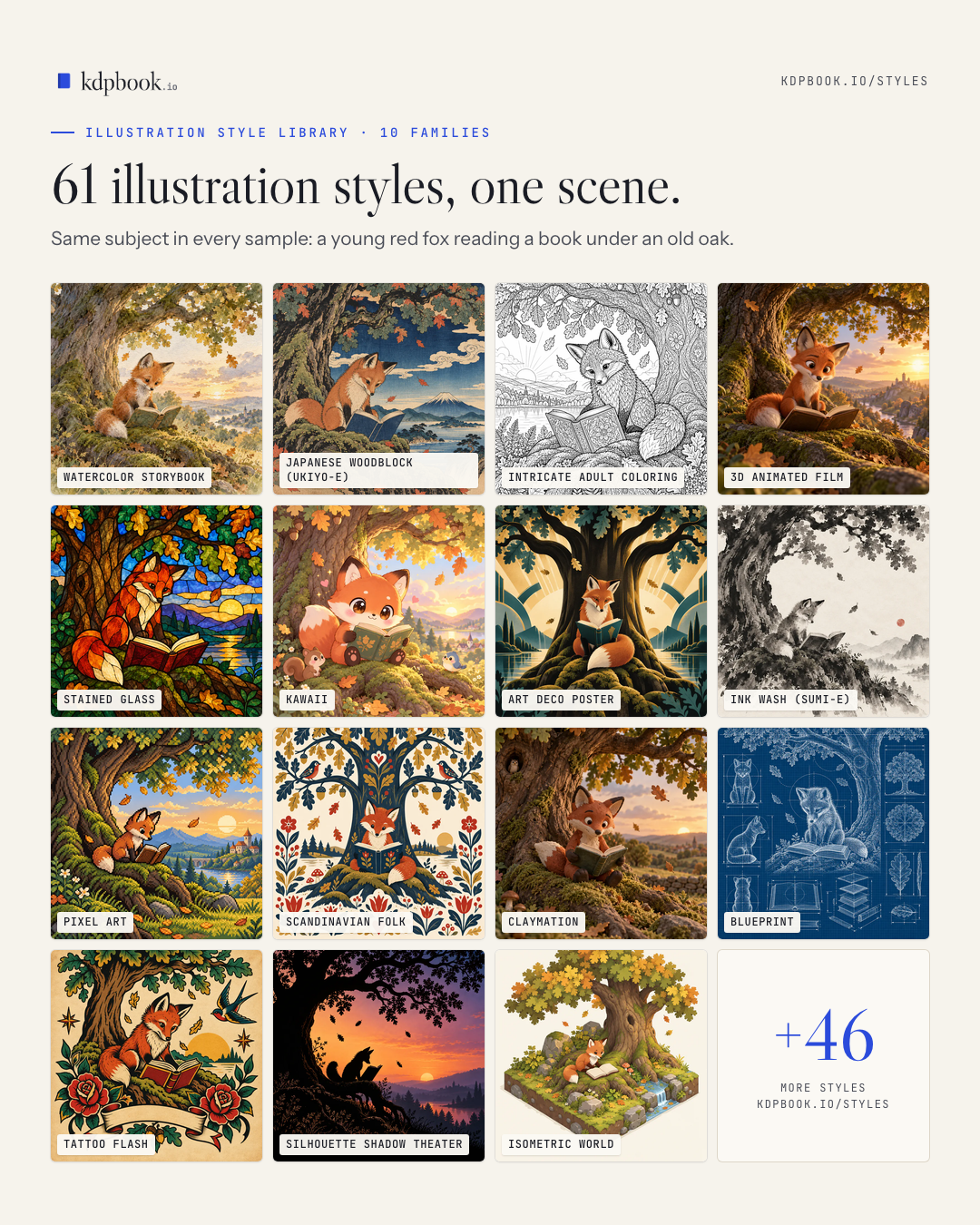
61 illustration styles, or yours

61 styles in 10 families, from watercolor and paper cut-out collage to manga and Japanese woodblock, or a custom style described in words or shown in up to three pictures.

Samples AI-generated by the kdpbook team for the kdpbook.io library.

Styles page (screen recording) · 8 s · loop MP4 · 1920 × 1080 · 18 s · 24.2 MB
10 family boards
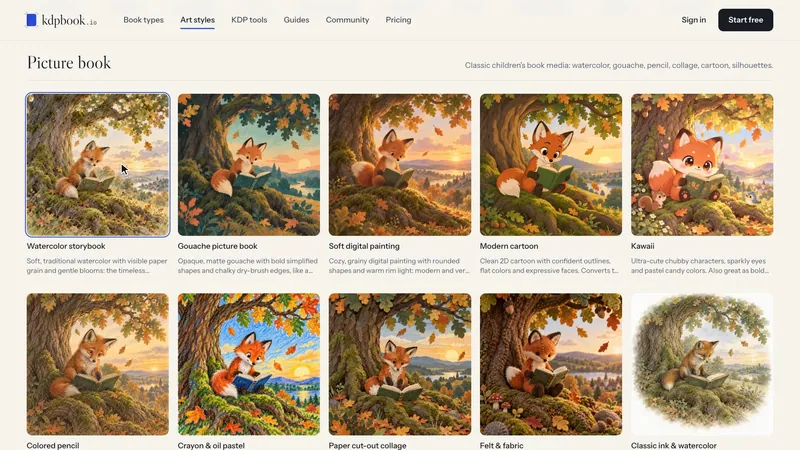
Board titled "Picture book" with 13 labelled square samples of a red fox reading under an oak, one per style: Watercolor storybook; Gouache picture book; Soft digital painting; Colored pencil; Crayon & oil pastel; Paper cut-out collage; Felt & fabric; Modern cartoon; Kawaii; Classic ink & watercolor; Soft pastel & chalk; Silhouette shadow theater; Spooky whimsical.
Style family: Picture book (13 styles)
Board titled "Painterly" with 4 labelled square samples of a red fox reading under an oak, one per style: Classic oil painting; Naive folk art; Fantasy digital painting; Ink wash (sumi-e).
Style family: Painterly (4 styles)
Board titled "3D & crafted" with 7 labelled square samples of a red fox reading under an oak, one per style: 3D animated film; Claymation; Plush toy diorama; Low-poly 3D; Origami & papercraft; Wooden toys; Embroidery.
Style family: 3D & crafted (7 styles)
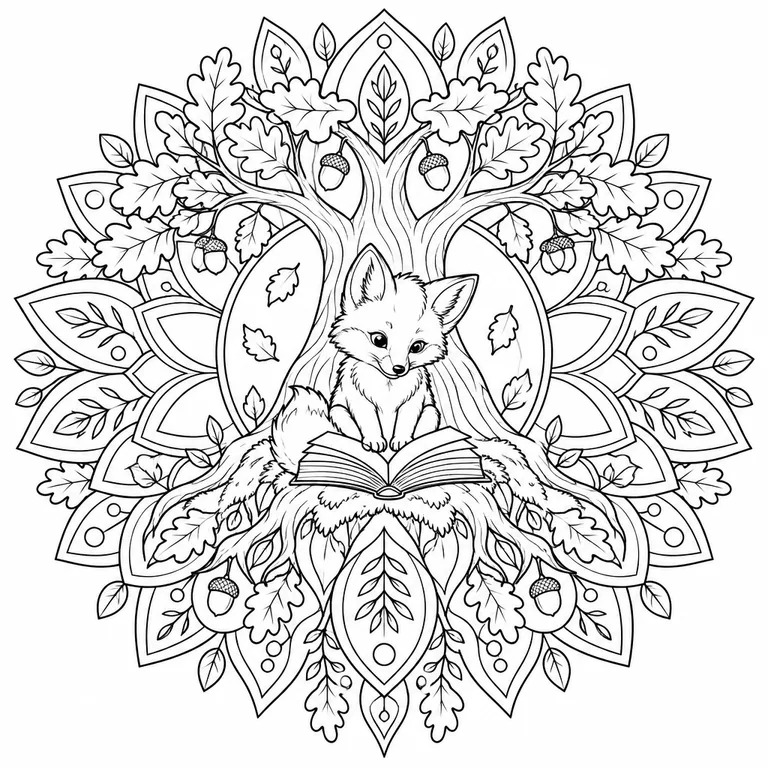
Board titled "Line art" with 7 labelled square samples of a red fox reading under an oak, one per style: Bold & easy coloring; Kids coloring (cartoon); Intricate adult coloring; Mandala; Realistic line drawing; Pen & ink; Pencil sketch.
Style family: Line art (7 styles)
Board titled "Comics & manga" with 7 labelled square samples of a red fox reading under an oak, one per style: American comic; Manga (screentone); Ligne claire (BD); Anime; 1930s rubber-hose cartoon; Noir ink, one spot color; Pixel art.
Style family: Comics & manga (7 styles)
Board titled "Photo-real" with 2 labelled square samples of a red fox reading under an oak, one per style: Editorial photo; Food photography.
Style family: Photo-real (2 styles)
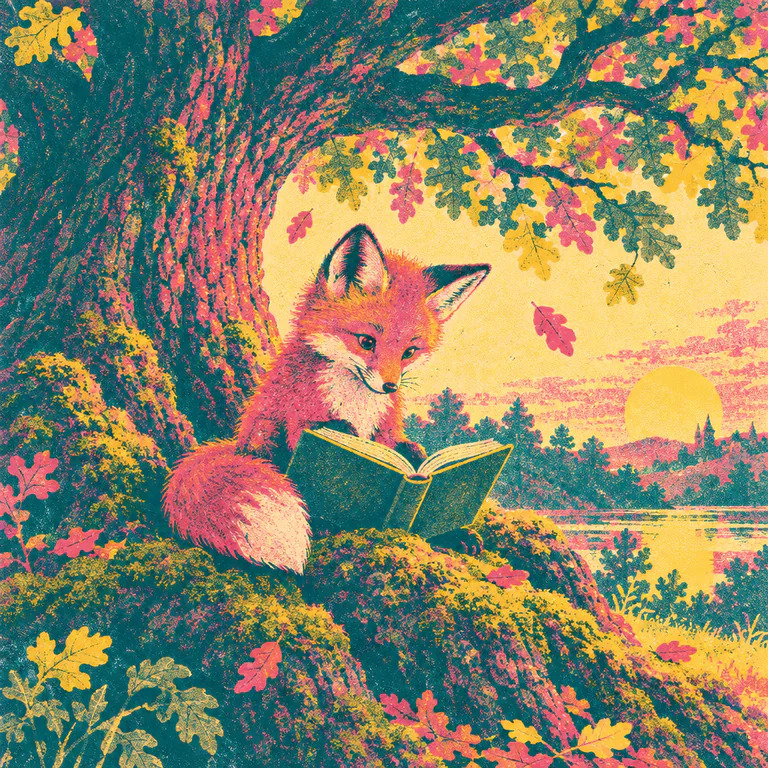
Board titled "Vintage" with 8 labelled square samples of a red fox reading under an oak, one per style: Mid-century storybook; 1970s storybook; Victorian engraving; Risograph print; Linocut print; Art nouveau; Art deco poster; Tattoo flash.
Style family: Vintage (8 styles)
Board titled "World & heritage" with 5 labelled square samples of a red fox reading under an oak, one per style: Japanese woodblock (ukiyo-e); Persian miniature; Illuminated manuscript; Mosaic; Stained glass.
Style family: World & heritage (5 styles)
Board titled "Minimalist" with 4 labelled square samples of a red fox reading under an oak, one per style: Flat vector; One-line drawing; Scandinavian folk; Marker doodle.
Style family: Minimalist (4 styles)
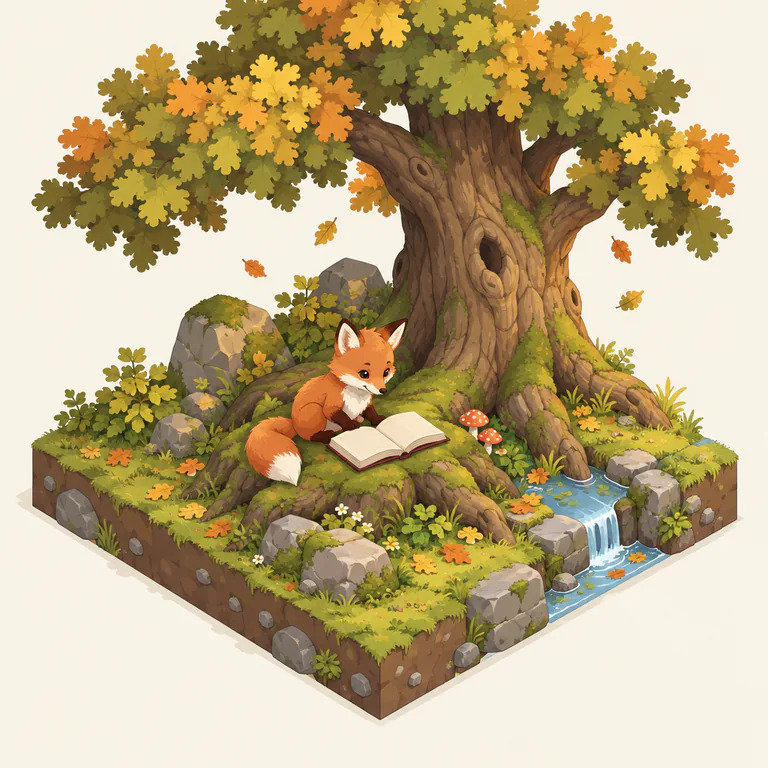
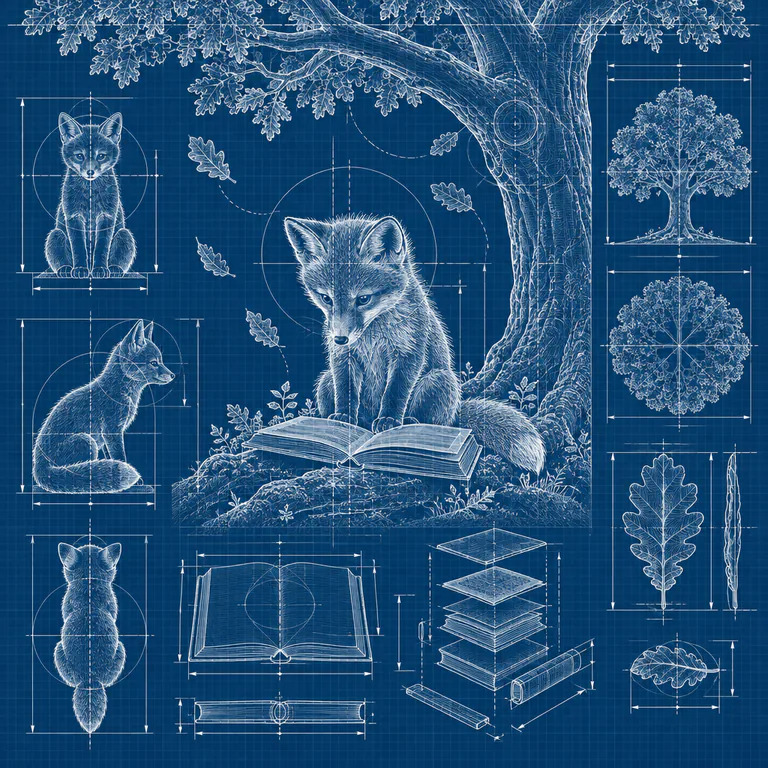
Board titled "Educational" with 4 labelled square samples of a red fox reading under an oak, one per style: Scientific diagram; Naturalist plate; Isometric world; Blueprint.
Style family: Educational (4 styles)
05 Book types 4 images · 4 videos
Three vertical films, with an English voice-over
Picture books: vertical film (22 s)
Novels: vertical film (23 s)
Non-fiction guide: vertical film (25 s)

36 types, from ABC to manga

Picture books, illustrated stories, novels, guides, coloring and puzzle books, journals and comics, each type with its own trim sizes, page range, reader ages and layout.

Samples AI-generated by the kdpbook team for the kdpbook.io library.

06 Editor, cover, fonts and repaints 6 images · 3 videos
Plate 06 · 8 s · loop MP4 · 1920 × 1080 · 16 s · 1.7 MB
kdpbook cover editor showing a full-wrap picture-book cover with the title selected on the front and the cover settings panel on the left.
Full-wrap cover editor
kdpbook editor with the font picker open on the left: a search box, filter chips and a list of fonts each previewing a line of the story.
Font picker previewing the book’s text
kdpbook editor with the Repaint this picture dialog open: two repaint options with credit costs, a text box with the requested change and a Fix button.
Repaint dialog: fix details or new picture

Page and cover editor

Pages shown as KDP prints them, 112 fonts or your own, round pictures and a cover sized from the final page count. Hand edits are free; a repaint costs as much as the original.

Illustrations AI-generated with kdpbook.io (sample by the kdpbook team).

07 KDP print rules 3 images · 1 video
FRONT COVERBACK COVERSpine123456
  1. Bleed 0.125 in
  2. Trim 6 × 9 in
  3. 200 pages × 0.0025 in = 0.5 in
  4. Spine text: over 79 pages
  5. Barcode area 2 × 1.2 in, kept clear
  6. Full wrap 12.75 × 9.25 in

Diagram: the full-wrap cover of a 6 × 9 in paperback, 200 pages on cream paper. Every number comes from the KDP rulebook in kdpbook.io’s code.

Plate 07 · 8 s · loop MP4 · 1920 × 1080 · 14 s · 999 KB
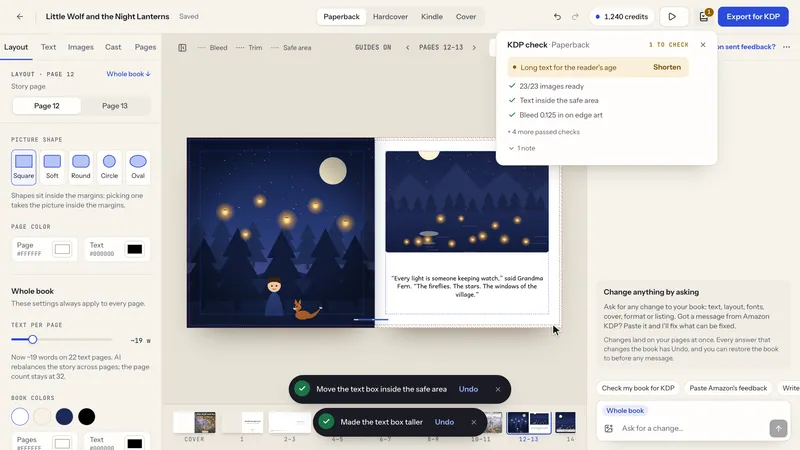
kdpbook editor with the KDP check panel open, listing two problems with Fix buttons, a note with a Shorten button and a list of passed checks.
KDP check with Fix buttons
kdpbook.io rejection decoder with a pasted KDP email on the left and a list of decoded issues on the right.
Free KDP rejection decoder
kdpbook wizard KDP format step with format cards for Kindle, paperback and hardcover and a list of ink and paper options.
KDP format: formats, ink and paper

KDP print rules, applied by code

Trim, margins, bleed, spine, page limits and barcode area come from a rulebook checked against KDP Help. A KDP check runs while you edit, with one-click fixes. KDP still reviews every book.

Screen: kdpbook.io, sample books by the kdpbook team.

08 The files KDP asks for 1 image · 1 video
Plate 08 · 8 s · loop MP4 · 1920 × 1080 · 12 s · 2.2 MB

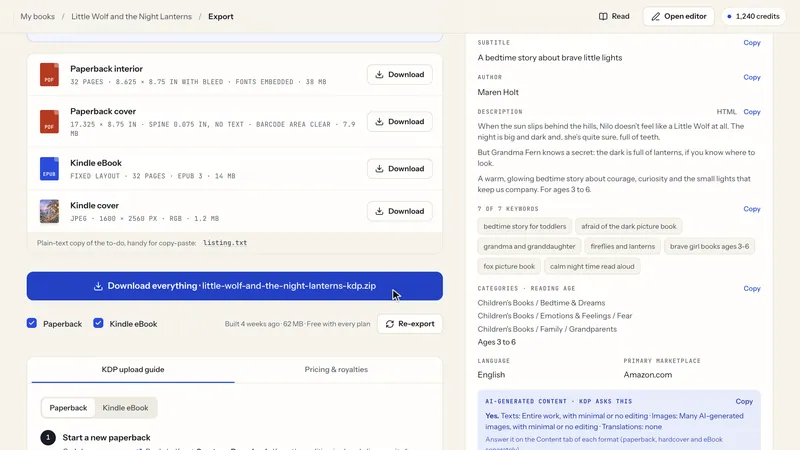
The files KDP asks for

Interior and full-wrap cover PDFs, a Kindle EPUB with its cover for books with a Kindle edition, and a listing sheet with title, description, seven keywords, categories and pre-filled AI-disclosure answers.

Screen: kdpbook.io, sample books by the kdpbook team.

09 kdpbook Publisher 3 images · 2 videos
kdpbook export page with a blue panel titled Your KDP draft, filled in for you, a Fill my KDP draft button and a drawing of KDP's three draft pages.
Fill my KDP draft, from the export page
kdpbook export page with a blue panel titled Your KDP drafts are ready, two formats marked draft ready and an Open the paperback on KDP button.
KDP drafts ready: the author publishes

KDP drafts filled by kdpbook Publisher

On paid plans, the free kdpbook Publisher extension for Chrome and Edge on computers fills in and saves the KDP draft in the author's own signed-in tab. It never clicks Publish: the author does.

Motion-design film by the kdpbook team; the KDP screens are re-creations, not a screen recording.

10 Comics and manga 2 images
Board titled "Comics & manga" with 7 labelled square samples of a red fox reading under an oak, one per style: American comic; Manga (screentone); Ligne claire (BD); Anime; 1930s rubber-hose cartoon; Noir ink, one spot color; Pixel art.
Style family: Comics & manga (7 styles)

Comics with panels and balloons

Comic and manga pages in panel grids, each panel painted at its shape, with speech, thought, shout and caption balloons placed after painting, away from faces where there is room. Print only.

Screen: kdpbook.io, sample books by the kdpbook team.

11 Coloring, puzzles and journals 5 images

Coloring, puzzle and journal pages

Coloring books with one design per page; 22 page generators for puzzles (with answer keys), tracing, games and journal pages. Letter puzzles use the book's own alphabet in 23 of the 34 languages. Print only.

Illustrations AI-generated with kdpbook.io (sample by the kdpbook team).

12 3D reader and library 5 images · 1 video
Plate 12 · 8 s · loop MP4 · 1920 × 1080 · 21 s · 5.5 MB
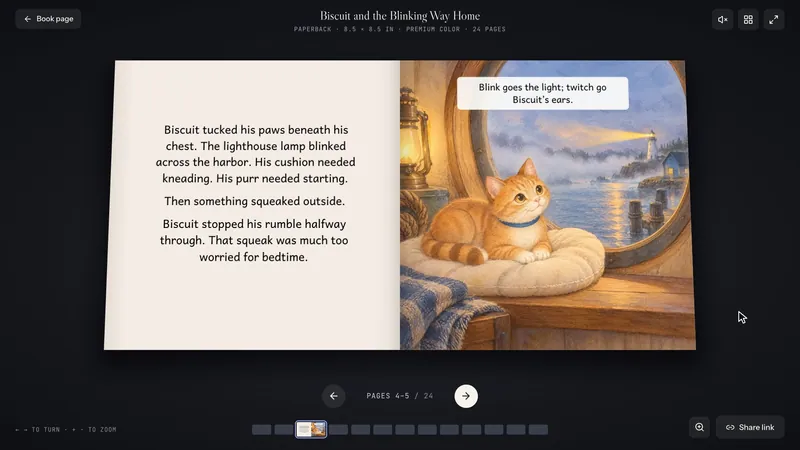
A picture book shown open in 3D on a dark background, with page navigation below.
3D book reader
kdpbook.io community library page with category filters and a featured book card.
Community library: books made with kdpbook

3D reader and community library

A 3D book player with paper page turns and the real cover, spine and back. Read the community library, or start a new book from another book's recipe (type, style, length), never its story.

Illustrations AI-generated with kdpbook.io (sample by the kdpbook team).

13 Free KDP tools 4 images · 1 video
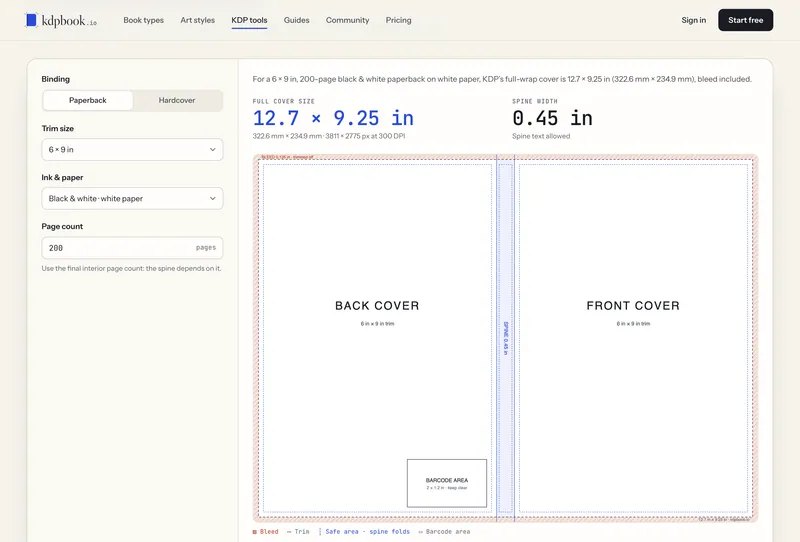
Spine width calculator (screen recording)
kdpbook.io word search maker with input fields on the left and a printable word search page preview on the right.
Free word search maker

17 free KDP tools

Spine width, cover size, printing cost and royalty calculators, a rejection decoder, word search, sudoku and maze makers, and KDP references. No account needed.

Screen: kdpbook.io, sample books by the kdpbook team.

14 The interface 11 images
Scroll →
Board 01 / 11 PNG · 4K · 1.6 MB

Describe it. Plan it in a chat.

Board 02 / 11 PNG · 4K · 2.9 MB

Pick the kind of book and style

Board 03 / 11 PNG · 4K · 1.1 MB

Story, characters and KDP format

Board 04 / 11 PNG · 4K · 1.3 MB

Watch it build, page by page

Board 05 / 11 PNG · 4K · 1.8 MB

Edit every page

Board 06 / 11 PNG · 4K · 1.4 MB

Ask the Book assistant. Run the KDP check.

Board 07 / 11 PNG · 4K · 2.2 MB

KDP files, and the KDP draft filled in

Board 08 / 11 PNG · 4K · 1.6 MB

Every kind of book

Board 09 / 11 PNG · 4K · 1.9 MB

Read, share and keep every book

Board 10 / 11 PNG · 4K · 1.3 MB

Free KDP tools, and the pricing

Board 11 / 11 PNG · 4K · 3.0 MB

On a phone too, in the browser

The interface, board by board

Eleven boards walk through the real screens: describing a book, building and editing it, the KDP files and draft, reading, the free tools and the phone. Each board is a 4K PNG and a 1080p JPG.

Screen: kdpbook.io, sample books by the kdpbook team.

04 Image library

Every image, with its file spec

150 images: 144 product images and 6 key visuals in English. Each in its largest size, most with a lighter JPG, and in zips under 48 MB.

Packs

Caption to run with book pages and covers Illustrations AI-generated with kdpbook.io (sample by the kdpbook team).

Showing 8 of 145 Showing 16 of 145

05 Video library

Films and screen recordings

19 videos: 5 films with an English voice-over and 14 silent reels and recordings of the real interface. Every MP4 downloads directly.

Showing 19 of 19

Films with voice-over · 2

  1. 0:46

    16:9 · Voice-over EN

    Describe your book: overview film (46 s)

    Motion-design film with an English voice-over: a one-sentence idea typed into the prompt box and a book plan card (picture book, watercolor storybook); the option to bring a manuscript; illustrated pages appearing one by one; a chapter title being typeset; a KDP preflight check; trim sizes, bleed and spine; the Export button with the interior, cover and Kindle files; the 2,000 free credits. The book pages in the film are drawn for the film, not made with kdpbook.io.

    Motion-design film made with pitchboom.io; the book pages shown are drawings made for the film.

  2. 0:43

    16:9 · Voice-over EN

    kdpbook Publisher film (43 s)

    Motion-design film with an English voice-over. From the Export page of a picture book, one click on “Fill my KDP draft” opens KDP; the kdpbook Publisher extension fills the title, description, keywords, categories, content files and pricing of a paperback draft and saves it as a draft. A “Never” card shows a KDP sign-in it does not touch, and the last step reads “Your turn: Publish”. The KDP screens are stylised re-creations, not a screen recording.

    Motion-design film by the kdpbook team; the KDP screens are re-creations, not a screen recording.

Social cuts · 3

  1. 0:22

    9:16 · Voice-over EN

    Picture books: vertical film (22 s)

    Vertical motion-design film with an English voice-over: a story idea typed into the prompt box, a page being painted, the same fox on every page, the cover “The Shy Little Fox”, then the interior PDF, full-wrap cover and fixed-layout Kindle eBook checked off. The fox drawings are made for the film, not with kdpbook.io.

    Motion-design film made with pitchboom.io; the book pages shown are drawings made for the film.

  2. 0:23

    9:16 · Voice-over EN

    Novels: vertical film (23 s)

    Vertical motion-design film with an English voice-over: “From one premise to a finished novel, laid out for print.” A typeset Chapter One page, the idea “A cozy mystery set in a seaside bakery” typed into the prompt box, chapters being written, an edited sentence, an illustrated cover, then the interior PDF, full-wrap cover and Kindle eBook. Pages and cover are drawn for the film.

    Motion-design film made with pitchboom.io; the book pages shown are drawings made for the film.

  3. 0:25

    9:16 · Voice-over EN

    Non-fiction guide: vertical film (25 s)

    Vertical motion-design film with an English voice-over: the idea “A beginner’s guide to sourdough baking” typed in, a progress card, a typeset chapter page with a tip box, a front cover with a loaf of bread, then the paperback interior and cover PDFs and the Kindle eBook. Pages and cover are drawn for the film, not made with kdpbook.io; the author publishes the book on KDP.

    Motion-design film made with pitchboom.io; the book pages shown are drawings made for the film.

Silent reels and screen recordings · 14

  1. 1:05

    16:9 · Silent

    Interface reel: from one sentence to KDP files

    Silent branded reel of the real kdpbook.io interface, no music: seven chapter cards in the kdpbook.io design (“Describe the book”, “Pick an illustration style”, “Edit every page”, “Ask the Book assistant”, “Check against KDP’s rules”, “Export the files”, “Read it in 3D”) each followed by the matching screen recording, and a kdpbook.io end card (“Describe a book. Get Amazon KDP-ready files.”). Illustrations AI-generated with kdpbook.io (sample by the kdpbook team). kdpbook.io is independent and not affiliated with Amazon. Kindle Direct Publishing and KDP are trademarks of Amazon.com, Inc.

    Illustrations AI-generated with kdpbook.io (sample by the kdpbook team).

  2. 1:52

    16:9 · Silent

    B-roll: silent screen recordings, no titles

    Silent B-roll, no titles, no music, no voice: 14 real-time shots of the kdpbook.io interface joined by 6-frame dissolves. The home page prompt and the site's “Watch a book come together.” demo, the 36 book types, the 61 illustration styles, then the editor of a sample picture book (moving and resizing a text panel, choosing the cover title font, the Book assistant applying “Make the story text 2 pt bigger on pages 5 to 9”, the repaint dialog, the KDP check with one-click fixes, the export files), the kdpbook Publisher extension page, the free KDP spine width calculator and the 3D reader turning the pages of a sample picture book. Timecoded shot list: kdpbook-b-roll-shotlist.txt. Illustrations AI-generated with kdpbook.io (sample by the kdpbook team).

    Illustrations AI-generated with kdpbook.io (sample by the kdpbook team).

  3. 0:18

    16:9 · Silent

    Home page: describe your book (recording)

    Silent screen recording of the kdpbook.io home page: a book idea is typed under the headline “Describe your book. We make it Amazon-ready.”, then the page scrolls to its looping demo of pages being written, illustrated and laid out with bleed, gutter and safe-area guides. With a short kdpbook.io title card and end card; a raw version without cards is included.

    Screen: kdpbook.io, sample books by the kdpbook team.

  4. 0:18

    16:9 · Silent

    Book assistant at work (screen recording)

    Silent screen recording of the kdpbook.io editor: “Make the story text 2 pt bigger on pages 5 to 9” is typed in the Book assistant and sent; a “Changes applied” card appears with Undo, and the text on the open spread and the Size field go from 20 to 22 pt. With a short kdpbook.io title card and end card; a raw version without cards is included.

    Screen: kdpbook.io, sample books by the kdpbook team.

  5. 0:18

    16:9 · Silent

    Styles page (screen recording)

    Silent screen recording of the kdpbook.io styles page scrolling through the Picture book, Painterly, 3D & crafted, Line art and Comics & manga families, every style showing the same fox scene. With a short kdpbook.io title card and end card; a raw version without cards is included.

    Screen: kdpbook.io, sample books by the kdpbook team.

  6. 0:13

    16:9 · Silent

    Book types page (screen recording)

    Silent screen recording of the kdpbook.io book types page scrolling through the Picture books, Illustrated stories and Novels & chapter books families; each card gives the type’s reader ages, page range and trim size. With a short kdpbook.io title card and end card; a raw version without cards is included.

    Screen: kdpbook.io, sample books by the kdpbook team.

  7. 0:16

    16:9 · Silent

    Editor: move, resize, swap (screen recording)

    Silent screen recording: on pages 10–11 of a sample picture book, a text panel is dragged down the page and made narrower (the text rewraps), then Swap sides exchanges the two pages. With a short kdpbook.io title card and end card; a raw version without cards is included.

    Screen: kdpbook.io, sample books by the kdpbook team.

  8. 0:17

    16:9 · Silent

    Cover: place the title, pick a font

    Silent screen recording of the cover editor: the front-cover title is nudged down with the arrow keys (its position shown in inches), then the font picker is searched for “hand” and Shrikhand is chosen. With a short kdpbook.io title card and end card; a raw version without cards is included.

    Screen: kdpbook.io, sample books by the kdpbook team.

  9. 0:15

    16:9 · Silent

    Repaint one detail (screen recording)

    Silent screen recording: a picture on page 10 is selected, the “Repaint this picture” dialog opens, “Fix details — keeps this picture” is chosen and the correction “Make the fox’s tail glow like a lantern.” is typed. Nothing is sent. With a short kdpbook.io title card and end card; a raw version without cards is included.

    Screen: kdpbook.io, sample books by the kdpbook team.

  10. 0:14

    16:9 · Silent

    KDP check: two fixes (screen recording)

    Silent screen recording: the KDP check of a sample picture book lists “Page 13: text in the margin” and “Page 16: text cut off”; Fix is clicked on each, the text box moves back inside the safe area and is made taller, each with Undo. With a short kdpbook.io title card and end card; a raw version without cards is included.

    Screen: kdpbook.io, sample books by the kdpbook team.

  11. 0:12

    16:9 · Silent

    Export page (screen recording)

    Silent screen recording of the export page of a sample picture book: the KDP preflight (all passed), then the files: paperback interior and cover PDFs, Kindle eBook (EPUB), Kindle cover (JPEG) and Download everything as one ZIP. With a short kdpbook.io title card and end card; a raw version without cards is included.

    Screen: kdpbook.io, sample books by the kdpbook team.

  12. 0:11

    16:9 · Silent

    kdpbook Publisher page (screen recording)

    Silent screen recording of the kdpbook Publisher page on kdpbook.io (a free extension for Chrome and Edge; filling a KDP draft needs a paid plan), scrolling through “What it does” and “What it never does”. With a short kdpbook.io title card and end card; a raw version without cards is included.

    Screen: kdpbook.io, sample books by the kdpbook team.

  13. 0:21

    16:9 · Silent

    Turning the pages (screen recording)

    Silent screen recording of the 3D reader with “Biscuit and the Blinking Way Home”, a sample picture book: the cover opens and pages are turned by dragging the corner and by clicking. With a short kdpbook.io title card and end card; a raw version without cards is included. Illustrations AI-generated with kdpbook.io (sample by the kdpbook team).

    Illustrations AI-generated with kdpbook.io (sample by the kdpbook team).

  14. 0:13

    16:9 · Silent

    Spine width calculator (screen recording)

    Silent screen recording of the free KDP spine width calculator: on black & white cream paper at 6 × 9 in, the page count goes from 200 to 312 and the spine width updates; Hardcover then shows 0.969 in, with the formula and the full cover size. With a short kdpbook.io title card and end card; a raw version without cards is included.

    Screen: kdpbook.io, sample books by the kdpbook team.

06 Fast facts

The numbers, and the paragraph about us

Counted from the product’s own code, so they match the app on the day you read them.

36
book types in 8 families
61
illustration styles in 10 families, or your own
34
KDP languages one per book
16 + 5
trim sizes paperback + hardcover
112
fonts or the author’s own
17
free KDP tools no account needed
2,000
free credits once, no card
0%
royalty taken and no publishing fee

Job ticket · fast facts

What it is
AI book studio for Amazon KDP, in the browser
How it works
Describe a book in a chat (or import a manuscript); kdpbook plans, writes, illustrates and typesets it
Formats
Paperback (16 KDP trims), hardcover (5 trims), Kindle eBook (reflowable or fixed layout)
Files
Interior PDF, full-wrap cover PDF, Kindle EPUB and cover, listing sheet with AI-disclosure answers
KDP rules
Trim, margins, bleed, spine, page limits and barcode area applied by code (checked against KDP Help on September 26, 2026)
Publishing
The author publishes on KDP; on paid plans the kdpbook Publisher extension (Chrome, Edge) fills and saves the KDP draft
Pricing
2,000 free credits once, no card (watermarked); Starter $25, Author $49, Studio $99 a month
Company
THE VIBECODING AGENCY (SARL), Paris, France

Boilerplate · about kdpbook.io

107 words

Paris-based kdpbook.io is an AI book studio for Amazon Kindle Direct Publishing (KDP). An author describes a book in a chat or imports a manuscript; kdpbook writes the text or typesets the author's own, illustrates it, then exports the interior and full-wrap cover PDFs, a listing sheet and, for books with a Kindle edition, a Kindle eBook. It covers 36 book types, 61 illustration styles and 34 KDP languages. Founder Arsène Huot launched it in September 2026. It is operated by THE VIBECODING AGENCY and is not affiliated with Amazon. New authors get 2,000 free credits once. Kindle Direct Publishing and KDP are trademarks of Amazon.com, Inc.

The same paragraph closes the release, in all 10 languages.

07 Logos & brand

Logos, colors and type

Vector and PNG logos for light and dark backgrounds, with the clear space shown in cobalt. Please keep the name in lowercase.

Colors

  • Ink #1A1C24 · RGB 26, 28, 36 Text, the dark stage
  • Paper #F6F3EC · RGB 246, 243, 236 Page background
  • Raised paper #FFFEFB · RGB 255, 254, 251 Sheets and cards
  • Cobalt #2B4BDB · RGB 43, 75, 219 The single accent

Type

  • Libre Caslon Display Headlines
  • Instrument Sans Interface and text
  • JetBrains Mono Labels and specs

How to write it

  • kdpbook.io in lowercase, even at the start of a sentence (rephrase instead); kdpbook in running text.
  • The extension is kdpbook Publisher; the chat in the editor is the Book assistant.
  • Never “KDPBook”, “KdpBook” or “KDP Book”.
  • Don’t set the logo next to Amazon or Kindle logos in a way that suggests a partnership.
08 Founder & company

Who makes it

The founder, and the company in Paris that runs kdpbook.io.

Founder

Arsène Huot

Founder of kdpbook.io; gérant of THE VIBECODING AGENCY, Paris.

Without accents: Arsene Huot.

“An AI can write a charming picture book and still miss the bleed by an eighth of an inch. So the AI does the writing and the painting, and plain code does the measuring. Our extension fills in the KDP draft and stops there: the Publish button belongs to the author.”
Request an interview
Imprint · the company

THE VIBECODING AGENCY

Form
société à responsabilité limitée (SARL), registered on August 15, 2026
Registry
RCS Paris · SIREN 108 800 616
Address
5 rue de la Moselle, 75019 Paris, France
Product
kdpbook.io, launched on September 26, 2026
Changelog
kdpbook.io/changelog · what shipped, with dates

kdpbook.io is independent and not affiliated with Amazon.

09 Accuracy notes

Before you file

Seven points that are easy to get wrong, and what kdpbook.io does not do.

  1. Not affiliated with Amazon

    kdpbook.io is independent and not affiliated with Amazon. Kindle Direct Publishing and KDP are trademarks of Amazon.com, Inc. kdpbook.io does not guarantee that KDP accepts a book: KDP reviews every book.

  2. AI disclosure

    Text and images generated with kdpbook are AI-generated content, and Amazon KDP requires publishers to disclose AI-generated text, images or translations. A manuscript the author wrote and imported is not AI-generated text. The listing sheet pre-fills the answers from what was actually generated; the author is responsible for them.

  3. The author clicks Publish

    kdpbook Publisher (Chrome and Edge, on a computer) fills in and saves the KDP draft in the author’s own signed-in tab. It never publishes, never signs in and never sees the password. The extension is free; filling a draft needs a paid plan.

  4. Word for word, with its limit

    An imported manuscript is printed word for word in 20 of the 36 types; the other 16 read it as a brief.

  5. Print only

    Coloring, puzzle, activity, workbook, journal and notebook books and comic panel books have no Kindle edition.

  6. Free plan

    Free-plan exports carry a “kdpbook.io preview” watermark and are not for sale; finished free-plan books are public in the community library.

  7. Samples

    The books and illustrations shown here were made by the kdpbook team. The interface is in English; books can be written in 34 KDP languages.

10 Media contact

Questions, interviews, a demo, other files

Arsène Huot, Founder, kdpbook.io

End of sheet · kdpbook.io press room · proof 01